
Workspaces List

Never lose track of Claude again. Manage multiple VSCode/Cursor workspaces with real-time AI status monitoring.

⚠️ macOS only (uses native window detection)

Why You Need This

Working with multiple Cursor instances? Stay organized and productive.

🪟

Unified Workspace View

See all your open VSCode and Cursor windows in one place. Click any workspace to instantly switch focus.

🤖

Claude Status Tracking

Real-time monitoring of Claude Code sessions. Know exactly which workspace needs your attention.

⚡

Smart Performance

Focus-aware monitoring ensures minimal resource usage. Only updates when you're actively looking.

Claude Status at a Glance

Visual indicators show you exactly what Claude is doing

⚠️
WaitingForInput
Claude needs your approval or input to continue
▶
Executing
Claude is actively working on tasks
◉
RecentlyFinished
Claude completed a task (color gradient fades over 30 minutes)
●
Running
Claude process is running but idle
○
NotRunning
No active Claude process detected
○
NoSession
No Claude conversation found in this workspace

See It In Action

Clean, intuitive interface that stays out of your way
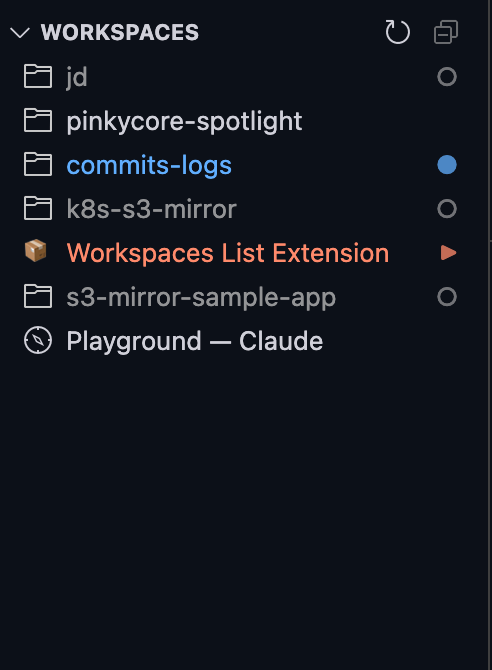
Workspaces List Screenshot

Configuration

All settings are optional - works great out of the box

workspacesList.statusMonitorInterval
number (milliseconds)
How often to check Claude Code status. Lower values provide faster updates but use more resources.
Default: 5000 (5 seconds)
workspacesList.processMonitorInterval
number (milliseconds)
How often to scan for Claude Code processes. This detects when Claude starts or stops running.
Default: 30000 (30 seconds)
workspacesList.executingThreshold
number (milliseconds)
Time threshold for detecting executing status. File activity within this window indicates Claude is actively working.
Default: 30000 (30 seconds)
workspacesList.waitingMessageAge
number (milliseconds)
Minimum age for assistant messages to be considered as waiting for input. Prevents false positives during rapid execution.
Default: 10000 (10 seconds)